Browser · Android · Computer — One Prompt

One prompt.
Real execution.

AutoPilotAI sends AI agents into your browser, computer, and Android phone to get work done — end to end, hands off.

Get it on Gumroad → See how it works
AutoPilotAI — Chat
you › Find the best iPhone 16 deal, compare across 3 sites, and generate a recommendation report.
Orchestrator routing → Browser Agent
Opened amazon.com → searching "iPhone 16 Pro"
Extracted prices: $999, $1049, $879 refurb
Opened bestbuy.com → scraped deal details + availability
Opened swappa.com → pulled 12 recent sold listings
Handing off → System Agent
Compared 3 sources · ranked by value + condition
↓ iphone-16-recommendation.md saved to ~/Desktop
Done in 47s.

AI assistants talk.
AutoPilotAI executes.

Most tools hand you back more text. You still have to open the tabs, copy the data, and stitch it together yourself. That's dictation — not automation.

Old way

💬
AI gives you a list. You open every tab manually, copy each price, and paste into a spreadsheet.
🔁
Repetitive work stays repetitive. Same briefing, same research, same cleanup — every week, by hand.
🧩
Tools don't talk to each other. Your web results never reach your phone. Your phone can't trigger a report.
🕳️
No output — just chat. You can't download a "conversation." You need real files, tables, and reports.

With AutoPilotAI

🌐
Browser agent does the clicking. Searches, extracts, fills forms — then turns it into a structured report.
Save it as a flow. Run it once, on a schedule, or repeat — the scheduler handles it while you're away.
🔗
Agents chain together. Web output feeds into a system report; phone results log to disk. One prompt, all three.
📁
Real files, every time. Reports, CSVs, markdown, spreadsheets — downloaded to your machine, ready to use.

Specialized intelligence,
working together.

Each agent masters its environment. Chain them in a single flow when the job spans the web, your machine, and your phone.

🌐
Browser Agent
The Web

Drives a real Chrome browser like a person would. Searches, navigates complex apps, fills forms, pulls the data you need, and turns it into structured reports.

  • Search, extract & compare across any site
  • Fill forms and navigate heavy web apps
  • Output tables, markdown, files — not vague answers
  • Persistent Chrome profiles so your logins stick
💻
System Agent
Your Computer

Takes command of your machine. Organizes and renames files, reads folders at scale, analyzes documents, PDFs, and spreadsheets, and produces clean outputs ready to use.

  • Organize, rename, and clean up files at scale
  • Analyze PDFs, Office docs, and CSVs — no extra tools
  • Generate reports, charts, and presentations
  • Run shell commands with safety guardrails
📱
Android Agent
Your Phone

Controls a connected Android device or emulator over ADB. Open apps, read messages, navigate the UI, take screenshots — all without touching the screen.

  • Works with real devices, AVD & Genymotion
  • Open, install, and navigate any app
  • Mobile smoke tests & QA checklists
  • Screenshots captured and saved automatically

Automate repetitive work,
forever.

Flow example — Daily Price Watch
1
Browser Agent
Search 3 retailers for target product
→ Outputs price list + availability
2
Browser Agent
Check deal aggregators for coupons
→ Appends discount data to context
3
System Agent
Rank options, compare to history log
→ Appends entry to price-history.csv
4
System Agent
Generate buy / wait / watch recommendation
→ Saves price-report-2026-04-24.md
🔗

Chain any agents together

Each step can use a different agent — browser, computer, or Android. Output from one step is automatically injected into the next.

Run on any schedule

Daily, weekdays, custom days and time in your timezone. A background scheduler picks up recurring work — no tab needs to stay open.

Once Scheduled Repeat N times Later

Built for things you actually do.

End-to-end automation across the web, your files, and your phone — not demos.

🛍️
Shopping & Deals

Compare prices across retailers, track a product over time, get a ranked "buy / wait / watch" brief saved locally.

📰
Daily Briefings

Morning news, market snapshots, and risk updates — exported as markdown reports you can share or archive.

🤝
Sales Prep

Research a company or contact on the web, then generate a meeting prep brief before the call — automatically.

🔍
Competitive Intel

Recurring competitor sweeps: pricing, announcements, roadmap signals — rolled into a comparison report weekly.

💰
Finance & Admin

Pull receipt files from a folder, categorize spend, and produce a clean monthly expense rollup automatically.

🧪
QA & Releases

Repeat browser paths to catch flaky UI. Run Android smoke checklists on real devices and log Pass/Fail to disk.

✍️
Content & Marketing

Turn a long article into social post outlines, internal notes, and summaries — all in one saved pack.

🗂️
File Housekeeping

Organize downloads, surface duplicates and large files, and get an actionable cleanup plan — in one run.

No black box.
See every step.

Task — iPhone 16 Price Report

0:01
Browser Opened amazon.com
Navigated to search results for "iPhone 16 Pro 128GB"
0:08
Browser Extracted 6 listings
Prices: $999, $1,029, $979 (3rd party seller)
0:19
Browser Scraped Best Buy + Swappa
Screenshot captured — 3 sources complete
0:31
System Ranking & analysis
Comparing by price, condition, seller rating
0:47
Done iphone-16-recommendation.md saved
~/Desktop · 2.4 KB · Recommendation: Buy on Swappa
🧠

Step-by-step actions & reasoning

Every decision the agent makes is logged in real time — what it saw, what it decided, and why.

📸

Screenshots along the way

Visual evidence of what the agent actually did — from every site it visited to every screen it tapped.

📂

Downloadable real files

Every run produces actual files — reports, CSVs, markdown — not just text in a chat window.

⏱️

Full timing & history

Every task is saved. Revisit any run, inspect what happened, and download outputs days later.

Made for people
who get things done.

⚙️
Developers & Builders

Automate workflows, QA runs, and release checklists. Stress-test with repeat flows. Use the direct agent consoles for power access.

🧑‍💼
Freelancers

Save hours on research, reporting, and admin. Generate client briefs, organize project files, and track competitor pricing — hands off.

🏢
Operators & Teams

Run daily briefings, inbox triage, data cleanup, and competitive reports on a schedule — without dedicated headcount.

🙋
Anyone with Repetitive Work

If you do the same digital task more than twice a week, AutoPilotAI can run it on autopilot — on your schedule, with your files.

Runs locally,
on your machine.

AutoPilotAI is self-hosted. You own the code, the data, and the agents. No cloud lock-in — it runs entirely on your computer.

🖥️

Fully local & self-hosted

A Next.js dashboard and a Node.js backend run on localhost. The browser agent controls Chrome on the same machine. Your files, prompts, and outputs never leave your computer unless you configure external services. Setup scripts for macOS, Linux, and Windows are included — one command to install and start everything.

Tech stack
Next.js
Frontend dashboard
Node
Node.js + Express
Backend API & agents
MongoDB
Task & flow storage
OpenRouter
LLM access (any model)
Chrome via CDP
Browser automation
ADB
Android device control
What you need
Required
Node.js 18+
Runs both the backend and builds the frontend
Required
MongoDB
Local install or MongoDB Atlas — stores tasks, flows, and history
Required
Google Chrome
On the same machine as the backend — powers the browser agent
Required
OpenRouter API key
Bring your own key — supports GPT-4o, Claude, Gemini, and more
Optional
ADB + Android device
For the Android agent — USB debug-enabled phone, emulator, or Genymotion
Optional
Google OAuth credentials
For "Sign in with Google" — or use email + password instead
macOS
One-command setup script included
Linux
One-command setup script included
Windows
.cmd setup script included

See it working,
for real.

These are actual screenshots from AutoPilotAI — real tasks, real outputs, real files on disk.
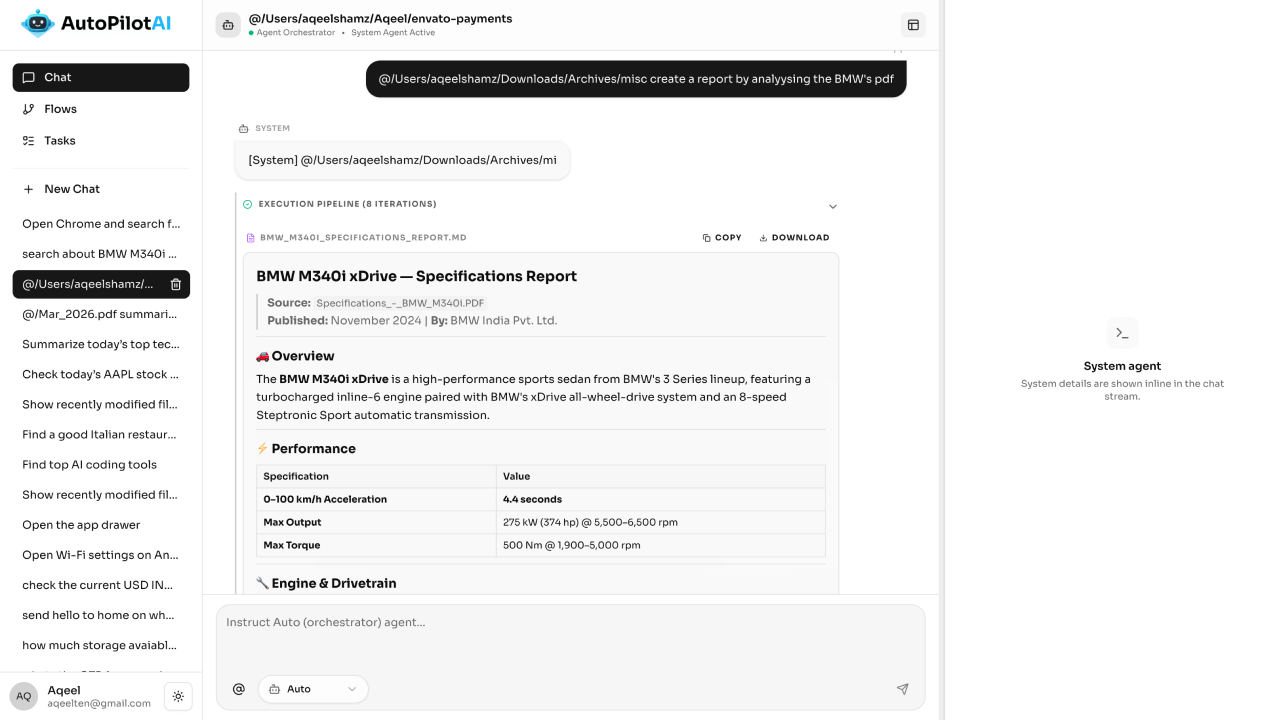
AutoPilotAI screenshot

Stop doing it manually.
Let agents handle it.

AutoPilotAI is available now on Gumroad. Bring your own AI key — works with any OpenRouter model.

Self-hosted · Bring your own API key · Browser + Android + Computer agents